Showing posts with label M$ Windows. Show all posts

Wednesday, 14 March 2018

Creating a 1 centimetre squared light grey grid on A4 paper using Inkscape

My wife wanted to draft out a crossword puzzle for her Rainbow Girl Guides unit. She needed a faint 1 centimetre squared grid to plan it out. She would use a pencil and plan the word positions. Finally, tracing over the words with a pen and drawing in required squares.

Inkscape is a free and open-source vector graphics editor, available for Linux, Windows and Mac OS X; it can be used to create or edit vector graphics such as illustrations, diagrams, line arts, charts, logos and complex paintings.

Inkscape has a Grid extension but, it requires that you enter some values in pixels.

So, in my case because I wanted 1 centimetre squares I

<SHIFT> + <CTRL> + <D>

which is the shortcuts keys for

File → Document Properties

I selected A4 and then selected in the 'Units' drop-down 'cm'. I noted down that, an A4 piece of paper was 21 cms width, by 29.7 cms height. I then changed the 'Units' drop-down to 'px' for pixels. This gave me 744.09 pixels width. I then divided 744.09 by 21. Rounding down...

35.43 pixels = 1 centimetres

Noting this down I then went and created the grid.

Extensions (Extras) → Render → Grid

I left the 'Line Width' at 1 pixel. I changed both the 'Horizontal' and 'Vertical' spacings to 35.4 pixels. Clicking on the 'Apply' button results in a visible and printable page with a 1 cms squared grid upon. However, this was in the default Stroke colour, black. I wanted to lighten this so that, it was just a faint background grid layout, for my wife to use. So, I wanted to change it to light grey colour lines.

Having highlighted the grid

<CTRL> + <A>

which is the shortcuts keys for

Edit → Select All

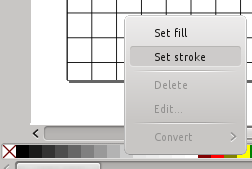
I then right mouse clicked on the '20% grey' colour from the colour pallete which was at the bottom of the editor pane. Offcourse, if I wanted this to be like a school math pages, I could have selected a light blue colour.

Done!

If you do not want to go through all of the above then, you can download my SVG file here,
A4_1cm_square_grid_paper.svg

Wednesday, 28 June 2017

Arrests in UK over Microsoft scam calls

At least one person I know will be happy to read about this. I had to wipe their PCs drive due to infection which resulted in this attempted scam. I then reinstalled M$ Windows with all the latest security patches. Thankfully, I was able to recover all their person files first.

Their PC got infected and a pop-up screen of some sort indicated a problem and to call the given 'Microsoft Support' telephone number. Although realising it was a scam, they then received numerous telephone calls, trying to get them to part with money to fix the PC remotely.

BBC News - Arrests in UK over Microsoft scam calls

'Vaccine' created for yesterdays Petya (NotPetya) Ransomware attack

This latest ransomware attack will encrypt your Windows files and demand a ransom to have your files restored. Researchers have found a way to vaccinate against this virus if, you have not already been infected.

BBC News article

How to Enable the NotPetya/Petna/Petya Vaccine

For my friends and family, your best bet is to download the following file from the link below. Then go to your 'Downloads' folder. Run the nopetyavac’ or, ‘nopetyavac.bat’ file by clicking your right mouse button on the file and selecting, ‘Run as Administrator’. It will create the necessary vaccine file.

Any problems, drop me a message. This needs to be done on all M$ Windows PCs/Laptops that you own.

Click here to download https://download.bleepingcomputer.com/bats/nopetyavac.bat

Anyone wishing to not use the above file and also wish to learn a bit more about this virus visit,

https://www.bleepingcomputer.com/news/security/vaccine-not-killswitch-found-for-petya-notpetya-ransomware-outbreak/

Monday, 29 May 2017

Trying to mount a Windows NTFS HDD on linux errors, "The disk contains an unclean file system"

I had a friend ask me to copy files from her old dying laptop of a spec that was only suitable for Windows XP. She had upgraded it to Windows 8.1 and it was struggling. She got hold of a newer laptop and wanted me to copy her files across.

Being the always cautious techie, I took the old HDD out and tried mounting it on my Ubuntu 14.04LTS, to virus and Rootkit scan it first, before backing up her files. The HDD would not mount and error with:

"The disk contains an unclean file system...."

A bit of research concluded that the Windows 8.1 system was probably set for Fast Startup.

How to disable or enable Fast Startup in Windows 8.1

I started the old laptop in Safe Mode and navigated to the Control Panel to 'Power Options' -> 'System Settings' -> 'Advanced'. I then unticked the box, 'Turn on fast startup (recommended)' thus disabling Fast Startup. Then, shutdown the laptop.

I was then able to mount the drive and access her files.

Thursday, 29 November 2012

TIP: How do I type the copyright symbol ©?

Mac

Simply enter Option + G.


M$ Windows

Whilst Num Lock is on, hold down the ALT key, keep depressed and type on the Numeric keypad '0169'.

Linux

This works on (k)ubuntu at least, using a UK keyboard.

AltGr + Shift + C keys.


Addendum

The above Linux solution did not work in GIMP for me when I was trying to create a Watermark for my photos.  The solution was to do the above in something like Kate (text editor), highlight and copy it to the Clip board and then paste it into GIMP's text editor window.


Saturday, 8 October 2011

Tunneling Remote Desktop over SSH in Windows 7

This was a difficult one because no matter what I tried, I could not get Remote Desktop to work over SSH (PuTTY) from a Windows 7 system. I just kept getting an error message that a Remote Desktop was already open.

After a lot of Red Herring websites http://blog.spencerkellis.net/2010/06/tunneling-remote-desktop-over-ssh-in-windows-7/ gave the answer.

Windows 7 blocks 3389 and 3390 from being used on the loopback interface. Answer was to use 3391 as the localhost port.

Take a look at that guys excellent instructions for setting up PuTTY SSH on your local system to then tunnel MS Remote Desktop connection via an encrytped SSH connection.

Categories: How-To, Microsoft, OS
Tags: Microsoft, Server, copssh, putty, remote desktop, SH, tunnel, Windows 7


Saturday, 23 April 2011

Convert .eps vector graphic to .pdf for editing in Inkscape

I bought an .eps vector graphic file from iStock and wanted to edit the elements for a company logo. I was going to do this on a Windows 7 system using Inkscape.

1) Install Ghostscript.
2) Install GSView.
3) Run GSView and open the .eps file.
4) Under File -> Convert..., select 'pdfwrite' Device and save with a .pdf extension.
5) Run Inkscape and open the .pdf file.
6) Save as a .svg file, ungroup and edit away!

Sources:
Ghostscript & GSView - http://pages.cs.wisc.edu/~ghost/
Inkscape - http://inkscape.org/

Categories: How-To, Microsoft, Windows, OS, Inkscape
Tags: edit, convert, .eps, EPS, vector, graphic, inkscape


Wednesday, 27 October 2010

How to fix "system missing or corrupt"

Problem:
You turn off your computer with M$ one day and then go to restart to find an error message that says:

Windows could not start because the following file is missing or corrupt
C:\windows\system32\config\system


check out this very good article that offers several fix solutions, including using a Linux Live CD.

I successfully fixed my son's XP problem, using the bloke's (PartieHonteuse) option 4 but, using my Kubuntu 9.10 and USB IDE docking station!

http://www.help2go.com/content/tutorials/28-c-windows-system32-config-system-missing-corrupt.html

Thursday, 2 September 2010

User account gets locked when trying to access mapped drive

We recently changed our security policies at work and set user passwords to expire every 60 days in GPO. Now time for people to change their passwords. A couple of users thus far have had no problems but, one user had problems. Having changed their password and then tried to access a mapped drive they get,
'The referenced account is currently locked out and may not be logged on to'.

Even if I removed the mapped drive, unlocked the account and then tried to map the drive again, the account would get locked.

I Googled and tried some suggestions with no result. What worked for me was, map the drive again and then click, 'Connect using a different user name' and type in users credentials, including the domain name.

i.e. '<domainname\username>' (mycompany\joebloggs) and their password.

This worked! Huh!???

Sunday, 18 July 2010

How to prevent Windows Server from storing weak LM hashes

How to prevent Windows Server from storing a LAN manager hash of your password.

Instead of storing your user account password in clear-text, Windows generates and stores user account passwords by using two different password representations, generally known as "hashes." When you set or change the password for a user account to a password that contains fewer than 15 characters, Windows generates both a LAN Manager hash (LM hash) and a Windows NT hash (NT hash) of the password. These hashes are stored in the local Security Accounts Manager (SAM) database or in Active Directory.

The LM hash is relatively weak compared to the NT hash, and it is therefore prone to fast brute force attack. Therefore, you may want to prevent Windows from storing an LM hash of your password. The Microsoft support article describes how to do this so that Windows only stores the stronger NT hash of your password.

http://support.microsoft.com/kb/299656


Categories: How-To, Microsoft, OS
Tags: Microsoft, Server, 2000, 2003, weak, password, authentication, NT hash, SAM


Friday, 18 June 2010

Server 2003 - Cannot delete file / folder

User had copied or created a file / folder on a mapped drive and that file / folder now cannot be renamed / deleted / accessed by anyone. Not even administrators, upon the server.

An overnight Backup Exec backup had failed to access this folder also. I therefore needed this fixed.

Microsoft's offered solutions ( http://support.microsoft.com/?kbid=320081 ) did not help.

Viewing 'Open Files' in Computer Management application showed a user still had the parent and this directory open. I checked with the user and they had not so, I simply forced a 'Close Open File' in Computer management and then I was able to successfully delete the folder.

Friday, 8 January 2010

Change Your Forgotten Windows Password with the Linux

Change Your Forgotten Windows Password with the Linux System Rescue CD

Author has tested this technique on both XP, Vista and Windows 7 with good results.

http://www.howtogeek.com/howto/windows-vista/change-your-forgotten-windows-password-with-the-linux-system-rescue-cd/

The Linux System Rescue CD is the one I mention and link to in my 'TIP: Anti-virus, Rootkits, Partitioning and Data Recovery' posting.

http://www.gb7imk.co.uk/t2_forum/viewtopic.php?t=172

* UPDATE *

If your a techie like me, that fixes computers for friends and family, you may often get given a M$ Windows PC where the owner has forgotten the Administrator or particular user's password.

You could just change the password with the utility above or, use something like Ophcrack http://sourceforge.net/projects/ophcrack/files/. This utility will crack passwords for Windows under XP, 2000, 98, and 95 users.

It is also educational to show your family and friends just how insecure there user password is, allowing you to encourage them to choose a stronger one![/url]

'How fast? It can crack the password "Fgpyyih804423" in 160 seconds. Most people would consider that password fairly secure. The Microsoft password strength checker rates it "strong". The Geekwisdom password strength meter rates it "mediocre".', says Jeff Atwood ( http://www.codinghorror.com/blog/2007/09/rainbow-hash-cracking.html ).

Plenty of tutorials on installing and using Ophcrack so use a search engine to find one to your preference. I may write one here myself soon.